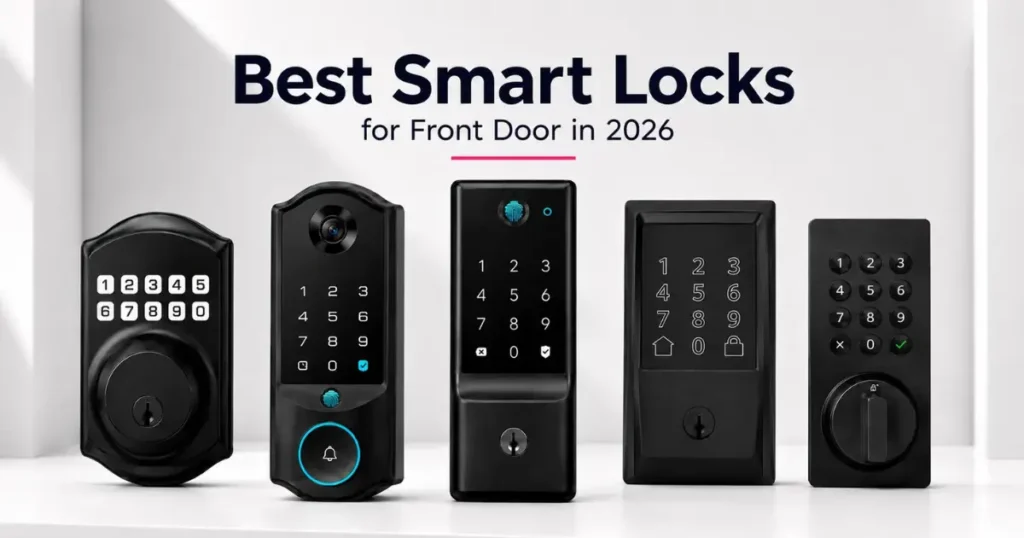
Swapping a regular front door lock for one of today’s smart locks sounds like a simple upgrade, right up until you notice how differently these five products actually work. Some connect straight to WiFi with no extra hardware. Meanwhile, others lean on Bluetooth and a hub. On top of that, a couple even fold a camera or a face-scanner into the deadbolt itself. Because the differences show up mostly in daily use, not on the box, it helps to know what you’re actually buying before a screwdriver comes out.
Below, we compare five locks that keep showing up in searches for smart locks and front door lock sets: the Philips 4200 Series WiFi Keypad Door Lock with Handle, the Schlage Encode Smart WiFi Deadbolt, the eufy Security Smart Lock C220, the eufy Security Smart Lock E40 with facial recognition, and the TEEHO TE001 Keyless Entry Deadbolt. In short, a few connect directly to home WiFi, one adds a full camera and doorbell, and one skips smart connectivity altogether in favor of a simple, reliable keypad. Here’s how they stack up on connectivity, unlock methods, battery life, and what each one actually includes.
Quick Comparison Table
| Model | Connectivity | Unlock Methods | Battery Life | Hub Required | Best For |
| Philips 4200 Series WiFi Keypad Lock | WiFi (2.4GHz), Bluetooth | Fingerprint, PIN, app, voice | 6 months | No | Best complete smart lock set with handle |
| Schlage Encode Smart WiFi Deadbolt | WiFi, Bluetooth | PIN, app, voice, physical key | 6 months | No | Best certified security, best Schlage smart lock |
| eufy Security Smart Lock C220 | WiFi | Fingerprint, PIN, app, key, Apple Watch, voice | 8 months | No | Best battery life and unlock flexibility |
| eufy Security Smart Lock E40 | WiFi, Bluetooth, Matter | Face, fingerprint, PIN, app | 6 months + backup | No | Best smart lock with built-in camera |
| TEEHO TE001 Keypad Deadbolt | None (offline) | PIN, physical key | 365 days | No | Best budget door lock with key backup |
Philips 4200 Series WiFi Keypad Door Lock with Handle — Best Complete Smart Lock Set
What Comes With It, and Why That Matters
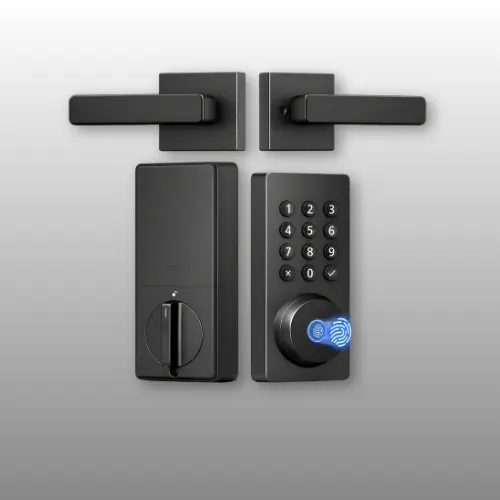
Most smart locks leave you buying a separate handle or lever set to match. Philips skips that step entirely, since this kit already bundles a full handle set alongside the deadbolt itself. Meanwhile, the lock connects straight to 2.4GHz WiFi with no bridge or hub in the mix, so setup is really just the app and a router password. On top of that, it unlocks four different ways — fingerprint, PIN code, the Philips Home app, or voice through Alexa and Google Assistant — which covers pretty much anyone in the house, from a teenager who forgets codes to a guest who’d rather use a fingerprint.
Key Features
- Direct 2.4GHz WiFi connection, no hub or bridge needed
- Fingerprint unlock in 0.3 seconds, with storage for multiple prints
- Permanent, one-time, periodic, and recurring PIN code options for guests or Airbnb use
- Auto-lock with an adjustable 0–180 second delay (off by default)
- Includes a matching handle set, so you won’t need a separate hardware purchase
- Roughly 6 months of battery life with a low-battery alert built in
Specifications
| Spec | Detail |
| Brand | Philips |
| Model Number | DDL242X-1HW-L |
| Connectivity | WiFi (2.4GHz), Bluetooth |
| Unlock Methods | Fingerprint, PIN, app, voice |
| Fingerprint Speed | 0.3 seconds |
| Auto-Lock Delay | 0–180 seconds |
| Battery Life | Approximately 6 months |
| Door Thickness | 1-3/8″ to 1-3/4″ |
| Color | Matte Black |
| Item Dimensions | 6 x 2.2 x 1.5 inches |
As a result, because the handle and deadbolt already match, there’s no guesswork over finish or style, and the whole front door ends up looking like one cohesive set rather than two mismatched purchases. Similarly, fast fingerprint access is a genuine convenience, especially compared to punching in a PIN every time. Even so, the lock caps out at 33 feet from the router, so a weak WiFi signal near the front door can cause dropped connections, and by default it only fits right-opening doors unless you take a moment to reset it for a left-opening one.
Why It Tops This List
Between the included handle set, fast fingerprint access, and flexible passcode options, this is the strongest all-in-one pick for anyone shopping specifically for a smart lock for front door use who doesn’t want to buy hardware twice.
Philips 4200 Series FAQ
Does this lock require a separate hub? No, it connects directly to 2.4GHz WiFi without any additional hardware. Does it come with a matching handle? Yes, a full handle set ships in the box alongside the deadbolt. Can you install it on a left-opening door? Yes, though the lock defaults to right-opening, so it needs a quick reset for the opposite direction.
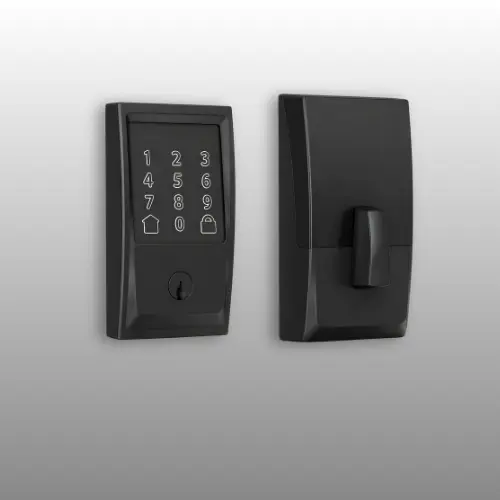
Schlage Encode Smart WiFi Deadbolt — Best Certified Security
What Comes With It, and Why That Matters
Schlage built its reputation on physical lock hardware long before smart locks existed, and that shows here. The Encode deadbolt carries BHMA’s highest certification for residential security, durability, and finish, so it isn’t a claim the marketing team invented on its own. Additionally, it stores up to 100 access codes, works with Alexa and Google Home, and syncs with Ring for anyone building out a broader smart home security setup. In addition, a built-in alarm triggers on unusual door movement or forced entry attempts, adding a layer most keypad-only locks skip entirely.
Key Features
- Built-in WiFi connects directly to the Schlage Home app, no separate hub needed
- Stores up to 100 unique access codes for family, guests, or staff
- Customizable alarm alerts on door movement or forced-entry attempts
- Works with Alexa, Google Home, and Ring for broader smart home integration
- Snap ‘n Stay design keeps the lock in place during one-person installation
- Runs on four AA batteries for roughly 6 months and ships with a physical backup key
Specifications
| Spec | Detail |
| Brand | Schlage |
| Model Number | BE489WBCEN622 |
| Connectivity | WiFi, Bluetooth |
| Unlock Methods | PIN, app, voice, physical key |
| Access Codes Supported | Up to 100 |
| Certification | BHMA highest residential rating |
| Battery Type | 4 AA batteries (included) |
| Door Thickness | 1-3/8″ to 1-3/4″ |
| Color | Matte Black |
| Item Weight | 3.4 pounds |
The BHMA certification genuinely sets this lock apart from most of the list, since it’s a third-party security rating rather than just a marketing phrase, and the 100-code capacity comfortably covers a larger household or a small rental property. Similarly, compatibility with Ring is a real advantage for anyone already using Ring cameras or an alarm system. However, this lock leans more toward pure security hardware than a full smart-home showpiece, so features like a fingerprint reader or a built-in camera aren’t part of the package here.
Why It Tops This List
For anyone who wants a schlage door lock backed by an actual industry security certification rather than just a WiFi badge, this is the deadbolt built specifically for that priority.
Schlage Encode FAQ
How many access codes can this lock store? Up to 100, which works well for larger households or small rental properties. Does the Schlage Encode work with Ring? Yes, it integrates with Ring devices for broader smart home security setups. Does it include a backup key? Yes, one physical backup key ships with the lock.
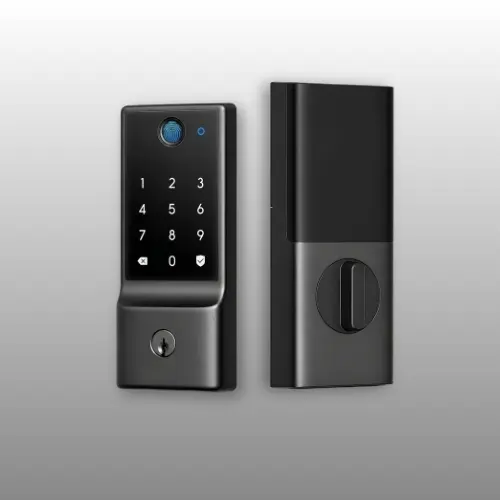
eufy Security Smart Lock C220 — Best Battery Life and Unlock Flexibility
What Comes With It, and Why That Matters
Eight AA batteries sounds like overkill until you realize it buys roughly 8 months of runtime, longer than most locks on this list manage. That extra power budget also supports a genuinely wide set of unlock options: fingerprint, keypad PIN, physical key, the eufy Security app, an Apple Watch, or voice through Alexa and Google Assistant. Better still, the fingerprint sensor uses self-learning AI, so recognition accuracy actually improves the more it gets used instead of staying static out of the box.
Key Features
- Runs on 8 AA batteries for roughly 8 months of use
- Self-learning AI fingerprint sensor that improves accuracy over time
- Six different unlock methods, including Apple Watch and voice assistants
- Skips the hub entirely, since it connects directly through built-in WiFi
- 15-minute installation with no drilling on most standard US and Canadian deadbolts
- eufy backs it with an 18-month protection plan
Specifications
| Spec | Detail |
| Brand | eufy Security |
| Model Number | T8506 |
| Connectivity | WiFi |
| Unlock Methods | Fingerprint, PIN, app, key, Apple Watch, voice |
| Battery Life | Approximately 8 months |
| Operating Temperature | -22°F to 158°F |
| Waterproof Rating | IP53 |
| Color | Black |
| Item Dimensions | 7.67 x 4.49 x 4.41 inches |
In fact, six unlock methods is more flexibility than almost anything else in this comparison, and the self-learning fingerprint sensor genuinely cuts down on failed scans over time rather than staying frustratingly inconsistent. On top of that, because it integrates with the broader eufy ecosystem, pairing it with a eufy doorbell unlocks shared routines between devices. On the other hand, the aluminum construction and IP53 rating trail the more heavily weatherproofed E40 model below, so an extremely exposed doorway might call for extra protection.
Why It Tops This List
Longer battery life, more unlock methods, and a fingerprint sensor that actually gets smarter with use — for anyone comparing options mainly on flexibility and runtime, this eufy doorlock earns its spot here.
eufy C220 FAQ
How long does the battery last? Roughly 8 months of typical use on 8 AA batteries. Does this lock require a separate hub? No, it connects directly to home WiFi without additional hardware. Can it integrate with other eufy devices? Yes, it pairs with eufy doorbells and other ecosystem devices for shared automation routines.
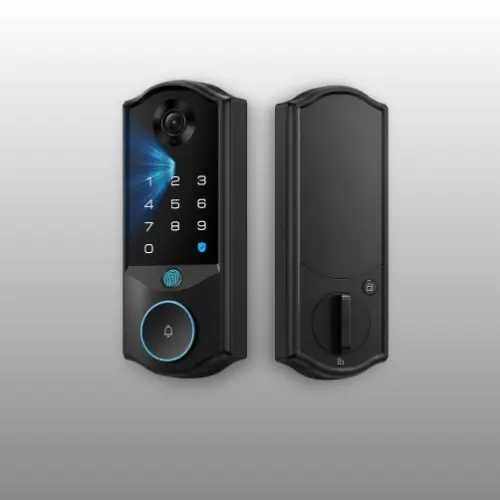
eufy Security Smart Lock E40 — Best Smart Lock with Built-In Camera
What Comes With It, and Why That Matters
The E40 isn’t really competing in the same category as the rest of this list, since it combines a deadbolt, a 2K camera, and a doorbell into a single device. In practice, facial recognition unlocks the door in under a second for anyone within roughly 3 feet of the sensor, and it works accurately across different skin tones, with or without glasses or makeup. Meanwhile, all of that footage and face data stays on 32GB of built-in local storage, so there’s no monthly subscription hiding behind the camera feature the way there often is with standalone video doorbells.
Key Features
- 2K camera with a 135° head-to-toe field of view for full visitor monitoring
- Facial recognition unlock, accurate across skin tones and with glasses or hats
- Includes 32GB of local storage, with no monthly subscription
- Dual power supply: a 15,000mAh rechargeable battery plus an 800mAh backup
- 60GHz radar motion detection that filters out pets and wind to cut false alerts
- Works with Apple Home, Google Home, Alexa, and SmartThings through Matter
Specifications
| Spec | Detail |
| Brand | eufy Security |
| Model Number | T85M0 |
| Connectivity | WiFi, Bluetooth, Matter |
| Unlock Methods | Face, fingerprint, PIN, app |
| Camera Resolution | 2K |
| Storage | 32GB local, no subscription |
| Battery | 15,000mAh rechargeable + 800mAh backup |
| Waterproof Rating | IP65 |
| Color | Black |
| Item Dimensions | 2.99 x 1.27 x 8.03 inches |
Overall, folding a camera, doorbell, and lock into one housing genuinely simplifies installation compared to buying three separate devices and trying to sync them afterward, and local-only storage means footage never depends on an ongoing subscription. Additionally, the radar-based motion detection is a real upgrade, since it specifically filters out false triggers from pets or wind rather than flooding the app with notifications. That said, Matter support doesn’t currently extend to camera streaming, so anyone wanting the video feed through Apple Home or SmartThings still needs to open the eufy app directly.
Why It Tops This List
No other lock on this list sees who’s actually at the door before it unlocks — for anyone whose main ask is a smart lock for door security that doubles as a camera and doorbell, this is the one built for exactly that.
eufy E40 FAQ
Does the camera require a monthly subscription? No, footage stays on the built-in 32GB local storage with no ongoing fee. Can you control this lock through Apple Home or Google Home? Yes, via Matter, though camera streaming currently requires the eufy app directly. How is it powered? A 15,000mAh rechargeable battery handles daily use, with an 800mAh backup battery activating automatically if power runs low.
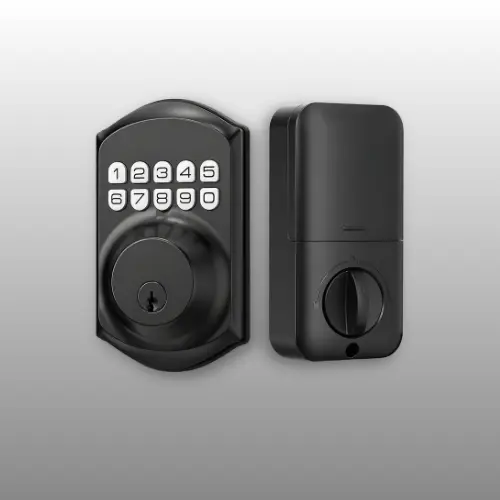
TEEHO TE001 Keyless Entry Deadbolt — Best Budget Door Lock with Key Backup
What Comes With It, and Why That Matters
Then again, not every front door needs an app, a camera, or a WiFi connection. TEEHO’s kit skips smart connectivity entirely and focuses on a solid keypad deadbolt instead, supporting 20 individual access codes plus a one-time PIN that deletes itself automatically after use. Because there’s no app, no subscription, and no WiFi dependency to troubleshoot, it’s a straightforward door lock with key backup for anyone who just wants reliable entry without the extra layer of a connected system.
Key Features
- Supports 20 individual user codes, plus a self-deleting one-time PIN
- Auto-lock with a 10–99 second delay, or instant lock by holding any key for 2 seconds
- Runs up to 365 days on 4 AA batteries, with a low-battery indicator
- ANSI Grade 3 security rating in a weather-resistant aluminum alloy build
- Includes 2 backup keys for manual entry if the keypad ever fails
- Backed by a 2-year warranty plus lifetime customer support
Specifications
| Spec | Detail |
| Brand | TEEHO |
| Model Number | TE001 |
| Connectivity | None (offline keypad) |
| Unlock Methods | PIN, physical key |
| User Codes | 20, plus one-time PIN |
| Battery Life | Up to 365 days |
| Waterproof Rating | IP54 |
| Security Rating | ANSI Grade 3 |
| Color | Matte Black |
| Item Weight | 16 ounces |
As a result, skipping WiFi and an app removes an entire category of things that can go wrong, since there’s no router pairing, firmware update, or dropped connection to deal with, ever. Furthermore, a full year of battery life on standard AA batteries beats most of the WiFi-connected locks on this list by a wide margin. On the downside, there’s no remote access or activity log without an app, so checking whether the door locked from outside the house isn’t an option here the way it is with the smart-connected picks above.
Why It Tops This List
Simple, reliable, and considerably cheaper than anything else on this list, this TE001 deadbolt is the strongest choice for anyone who wants a dependable door lock with key backup rather than a full smart home device.
TEEHO TE001 FAQ
Does this lock connect to WiFi or an app? No, it operates entirely offline through the keypad and physical keys. How many access codes can it store? Up to 20 individual user codes, plus one self-deleting one-time PIN. How long does the battery last? Up to 365 days on 4 AA batteries under typical use.
Final Verdict: Which Smart Lock Is Best for Your Front Door?
- If having a matching handle set and fast fingerprint access matters most, the Philips 4200 Series covers both without needing a second purchase.
- Prioritizing a certified, security-first deadbolt from an established lock brand? The Schlage Encode carries the industry certification most WiFi locks skip entirely.
- Want the longest battery life along with the widest range of unlock options? The eufy Security Smart Lock C220 handles both better than anything else here.
- Need to see who’s at the door before it opens? The eufy Security Smart Lock E40 folds a camera and doorbell into the lock itself, with no subscription attached.
- And if a simple, reliable keypad without WiFi or an app is really the goal, the TEEHO TE001 delivers that at the lowest price on this list.
Buying Guide: How to Choose the Best Smart Lock for Your Door
WiFi vs. Bluetooth vs. No Connectivity
For example, a direct WiFi connection, like the Philips, Schlage, and both eufy locks offer, means remote access from anywhere without a separate hub. Bluetooth-only locks trade that remote reach for a simpler, more private setup limited to close range. Meanwhile, an offline keypad like the TEEHO skips connectivity altogether, which removes both the convenience and the potential points of failure that come with any connected device.
Unlock Methods That Actually Matter
For instance, fingerprint access, offered by the Philips, eufy C220, and eufy E40, tends to be the fastest daily option once it’s set up correctly. Meanwhile, PIN codes remain the most universal method across every lock on this list, useful for guests or anyone who’d rather not register a fingerprint. Facial recognition, found only on the eufy E40, adds a genuinely hands-free option, though it’s also the newest technology here and the least tested over the long run.
Battery Life and Power Source
Battery life ranges from roughly 6 months up to a full year across this lineup, with the TEEHO’s 365-day rating standing out specifically because it skips WiFi entirely. On the other hand, the eufy E40 takes a different approach with a rechargeable battery plus an automatic backup, trading disposable batteries for a charging routine instead.
Security Certifications and Build Quality
Admittedly, not every “smart lock” carries a formal security rating. The Schlage Encode stands out here with BHMA’s highest residential certification, while the TEEHO holds an ANSI Grade 3 rating, a respectable baseline for a budget-friendly door lock with key backup. In the end, checking for a named certification, rather than just marketing language like “reinforced” or “heavy-duty,” is one of the more reliable ways to compare actual security across brands.
Camera and Smart Home Integration
If a camera-equipped smart lock for front door use is the goal, the eufy E40 is the only option on this list built around that specifically. On the other hand, for broader smart home integration, the Schlage Encode’s Ring compatibility and the eufy locks’ ecosystem support both make it easier to fold a new lock into an existing setup of cameras, doorbells, and voice assistants.
Frequently Asked Questions
What is the best smart lock for a front door in 2026?
It depends on the priority. The Philips 4200 Series is the strongest all-in-one pick with a matching handle set, while the Schlage Encode wins on certified security, and the eufy E40 covers anyone who wants a built-in camera.
Do smart locks require a hub to work?
Not on this list. The Philips, Schlage, and both eufy locks all connect directly to home WiFi without any separate hub or bridge.
What’s the difference between a smart lock and a regular door lock with key?
A smart lock adds remote access, app control, and often biometric or code-based entry, while still keeping a physical key as backup on most models, as seen with the Schlage, eufy C220, and TEEHO here.
Are Bluetooth door locks less secure than WiFi ones?
Not inherently. In fact, Bluetooth connections stay limited to close range, which some people actually prefer for privacy, while WiFi-connected locks trade that limited range for remote access from anywhere.
Which lock on this list works best for rental properties or Airbnb use?
The Philips 4200 Series and Schlage Encode both support recurring or one-time passcodes well suited to guest turnover, while the Schlage’s 100-code capacity handles larger rental portfolios more easily.
Do any of these smart locks avoid a monthly subscription fee?
Yes, all five. Even so, the camera-equipped eufy E40 stores footage on 32GB of built-in local storage with no subscription required.
Conclusion
Choosing among these comes down to which category actually matters for your front door: a matched hardware set, certified security, longest battery life, built-in camera coverage, or a no-frills keypad. Go with the Philips 4200 Series for a complete matching set with fast fingerprint access; the Schlage Encode for certified, security-first hardware; the eufy C220 for battery life and unlock flexibility; the eufy E40 if seeing the door matters as much as locking it; and the TEEHO TE001 for a dependable, subscription-free lock at the lowest price here.
In the end, match the lock to how connected you actually want your front door to be, not just the feature list on the box, and it should serve the house well for years. Pairing a smart lock with a video doorbell or security camera rounds out your front-door setup even further — see our guide to [Internal Link: relevant abestfive.com article, e.g. Best Home Security Cameras] for picks that work well alongside these locks.